The client came to us with what sounded like a very simple request: they had an existing WooCommerce shop that worked reasonably well, needed a few small adjustments, and would need support afterwards. Orders were coming in, there were no major issues, and nobody was asking for a new system. We reviewed the code, found some performance improvements and security issues, made the necessary fixes, and expected this to become one of our simplest support projects.
If you have ever worked with WooCommerce, you know that security issues are its second name if you don't cook it properly, and installing Wordfence alone will not close them. That part didn't surprise us. What surprised us was how badly we had misunderstood the job behind the request.
This is the story of our fuckup: we thought we understood what the customer needed, spent far too long repairing something that should have been replaced, and eventually made the uncomfortable decision to throw out a large part of the existing logic and build a different workflow. We got to a better solution, but we could have saved both sides time and money by understanding the need at the beginning.
“The system works well. Please don't change it.”
The customer was quite clear about the boundaries. There were no big new requirements, the shop was working, and products were imported from the point-of-sale system, or POS. They managed those products in WooCommerce themselves, were happy with that workflow, and did not want us to suggest something else.
That sounded reasonable, so we respected it. What we didn't do was investigate what “working well” meant in everyday practice: how many products needed manual attention, which information arrived from the POS, what had to be corrected in the shop, and what happened when the two systems disagreed. We accepted the customer's description of the process before we had watched enough of the process ourselves.
The first serious clue arrived as a phone call: some products had disappeared from the catalogue. We went through logs and database records, found overwritten product data and a broken catalogue, and established that more than 10% of the items were affected. The most obvious suspect was the import script that brought prices, stock and new products from the POS into WooCommerce.
The script had been there long before us. We had checked its code when taking over the project, found relatively straightforward logic, and subsequently verified that imports ran without errors. It had years of apparently successful operation behind it, which made “if it works, don't touch it” feel like a sensible rule. We were about to discover how much that word “apparently” was doing for us.
The import finished successfully; the catalogue did not
First we dealt with the immediate damage: unpack the latest backup, extract the product data, and merge it into the existing database. We restored the products and stopped the script while we investigated. The customer agreed to tell us about price updates and major stock changes so we could apply them manually and keep the drift manageable.
Then we started looking beyond whether the script executed correctly. What exactly was it being fed? The hourly CSV had no header row, and a few representative lines looked like this when opened as a table:
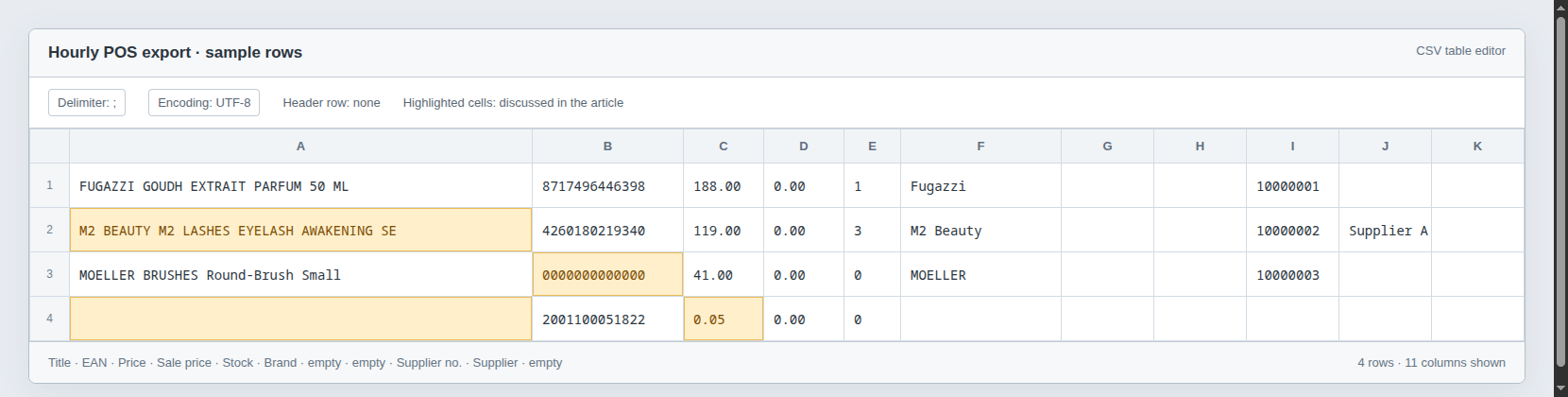
The columns were title, EAN, price, sale price, stock, brand, two empty columns, a supplier article number, a supplier-related field and another empty column. There was no separate size or variant column; the size existed only inside the title. Titles were cut off at 40 characters, so “AWAKENING SE” meant “AWAKENING Serum”, some EANs were placeholders such as 0000000000000, and some rows had no title and a price of CHF 0.05.
For an existing product we matched the EAN and updated price and stock. A new article became a draft in WooCommerce, where the customer corrected the title, added descriptions, images and brand information, and published it. If a perfume came in several sizes, the POS supplied separate lines and the customer manually created the parent product and assigned the variants.
You can see why we initially thought this was manageable. The title was cut off, but it was corrected manually anyway; the POS supplied commerce data, and the customer supplied the presentation. What we had not clarified was who maintained the POS data, how that work was done, and whether an EAN stayed attached to the same article over time. We had quietly promoted a cash-register export into a reliable product-information system in our heads.
The missing products had not simply vanished
Our integration treated EAN as a stable identity, while the POS and the shop had different ideas about what made a product the same product. An article could come back into the POS with a different EAN, for example around a relaunch or another receipt of goods, even though the webshop still needed to treat it as the same scent and size.

The shop stayed linked to the old EAN, showed zero stock and stopped receiving updates, while the import could create what looked like a new product. Nothing crashed, nobody received an error message, and the old shop product was still there. The connection had broken quietly.
This had been happening before we took over. Disconnected products accumulated over months and years, and we had neither looked for that failure mode nor recognised its scale. When we later tried to correct stock errors, our change caused those disconnected products to be unpublished. The underlying problem was older than our involvement, but triggering that damage and missing the problem during discovery were our responsibility.
We then made our next wrong decision: we tried to repair the discrepancies and keep the same workflow. We found EAN changes in logs, dug through old backups, restored products and assigned the right links. Where we couldn't recover things automatically, we gave the customer lists to work through manually. We were still treating each discovery as another defect in an otherwise viable arrangement.
Every answer opened another drawer
The customer started repairing the remaining products and came back with another problem: whole brands were not being displayed. Looking at the brand column made the next part of the mystery less mysterious.
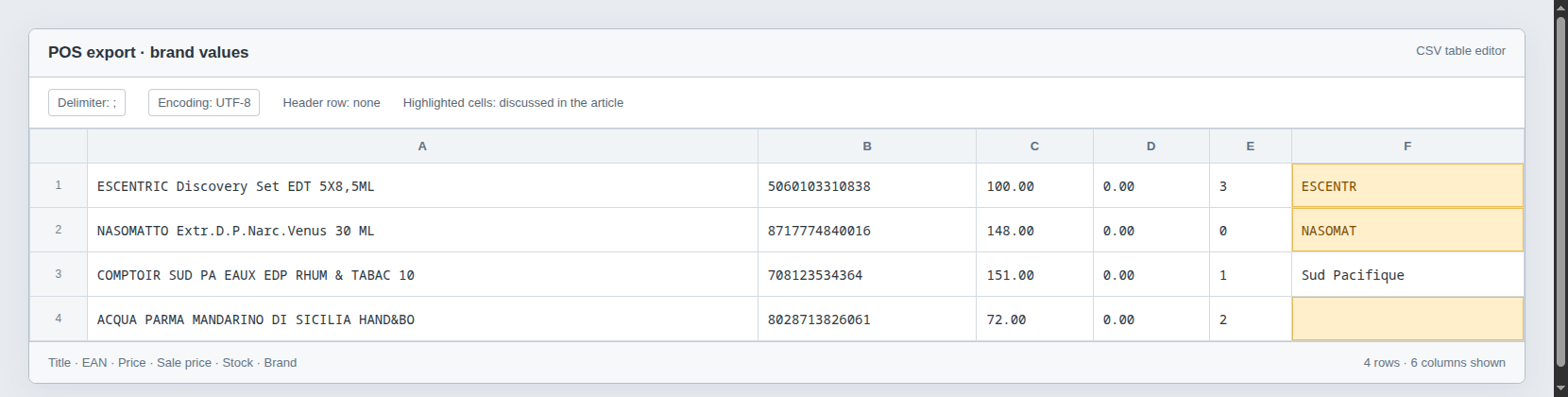
“ESCENTR” and “NASOMAT” were truncated names, “M2 Beauty” and “M2 Beauté” referred to the same brand, and “Sud Pacifique” and “Comptoir Sud Pacifique” were another pair of spellings. In the dataset described here, 1,269 of 2,903 articles had no brand at all; the mapping now handles 167 different spellings. Each correction seemed to reveal another assumption we had made about the data.
By the second month, the customer was upset and we could feel their trust slipping away. Our developers were working hard, but we still could not reliably answer the questions that mattered: which products should be online, which brands were incomplete, which edits were intentional, and what the customer expected to see next.
As we went through the customer's actual work, another part became obvious. This supposedly reliable workflow depended on a huge amount of daily human effort: opening products, repairing titles, assigning brands, finding pictures, arranging sizes, checking what had arrived and deciding what could go online. The customer had become so used to compensating for the system that this work felt like the normal cost of running the shop.
Now imagine doing all that annoying work and then discovering that an import has overwritten it, disconnected it or made it disappear. You don't know whether the developers can restore it from a backup or whether you will have to do it all again. Their frustration was about losing hours of work and confidence in the catalogue, not merely about a CSV parser behaving strangely.
That was the point where the investigation finally changed direction. The customer had asked us to support the existing POS-to-WooCommerce chain, but what they needed was to stop being the person who held that chain together by hand. They hadn't recognised that need when they briefed us, and we hadn't recognised it when we accepted the brief.
The hard decision was to stop fixing the old chain
We called the customer and told them that another round of patches would not make the current arrangement reliable. The product data was too fragmented, its identity depended on values that changed outside the shop, and manual editorial work had no safe central home. This had been true for a long time; our mistake was failing to uncover it when we took over and then spending two months fixing symptoms where we should have changed the design.
The hard part was proposing a new system after agreeing to preserve the old workflow, while the customer was already frustrated and wondering whether we could fix the damage. We had to acknowledge that part of our previous work was not taking us towards a lasting solution, remove a substantial amount of existing import logic, and ask the customer to invest effort in cleaning the catalogue again. Continuing to patch the familiar system felt easier in the short term, but we no longer believed it could do the job reliably.
Our proposal was a standalone product information management platform between the POS and WooCommerce. Product titles, descriptions, images, brands, categories and sizes would have one central home; the POS would supply price and stock, and the shop would display the reviewed product information it received. The EAN would become an explicit link to a product size rather than the identity of the product itself.
The customer's part was still real work: go through the brands, decide which products belonged online, and clean up the data. The difference was that this work would now be saved in a system that owned it, kept its history and showed when another system disagreed. We were changing the arrangement that had made their manual effort so fragile.
We called the tool Flakon, the German word for a perfume bottle. A perfume business getting its product data into a Flakon amused us more than a sensible software name probably should. We had briefly used “PMS” as the working title, then remembered the abbreviation had other meanings; a perfume bottle felt like the safer choice.
Start with the brand, because that is where the customer starts
One of our most useful findings had nothing to do with the import algorithm: the customer spent most of their editing time working through a brand. An endless list of every product was an accurate database view and a poor starting point for their day, so brands became the main way into Flakon.
Inside a brand, the customer can see the products already online, those offline or unfinished, missing information, and new articles arriving from the POS. They no longer need to assemble that picture by jumping between unrelated lists or remembering what they last fixed.
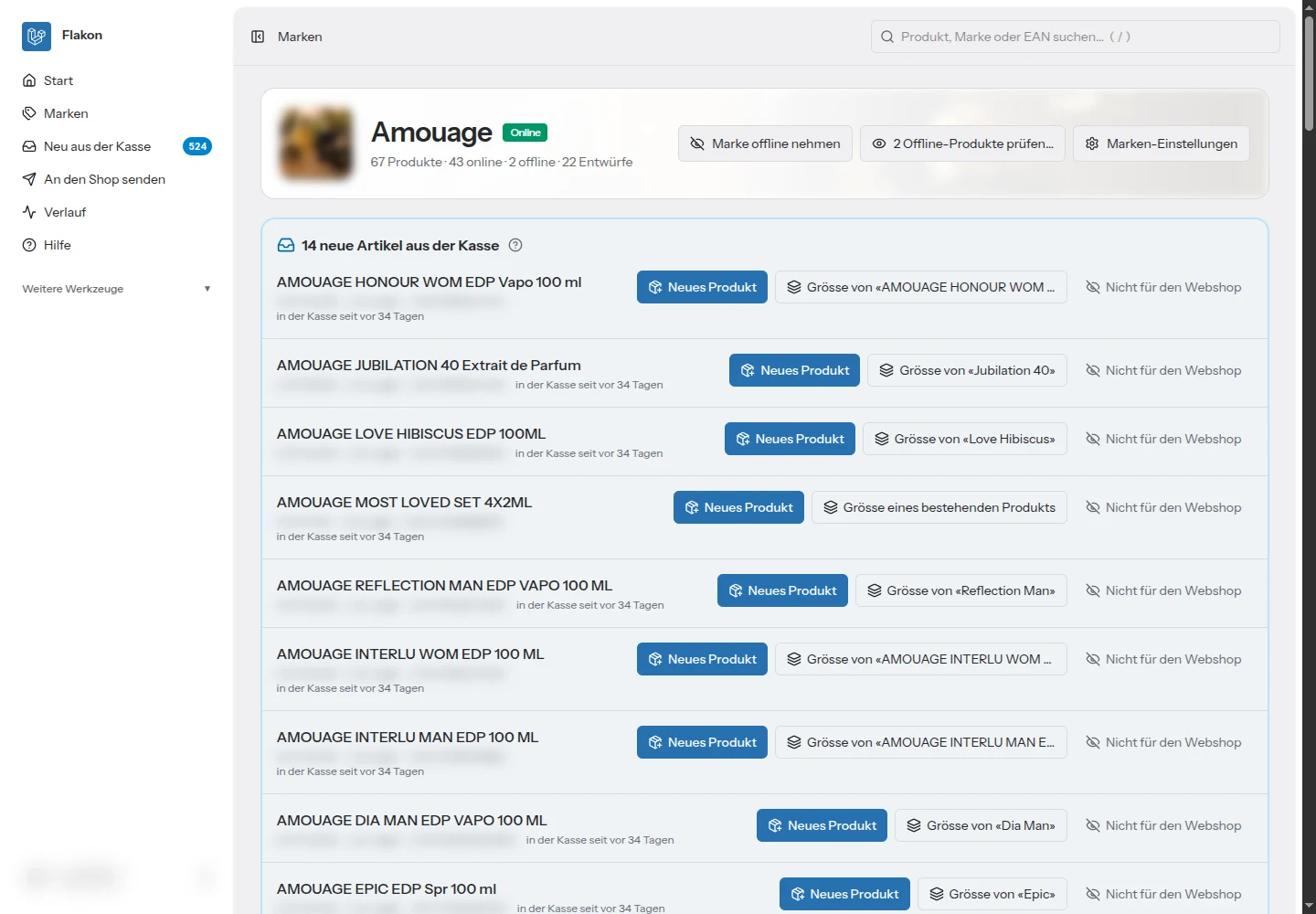
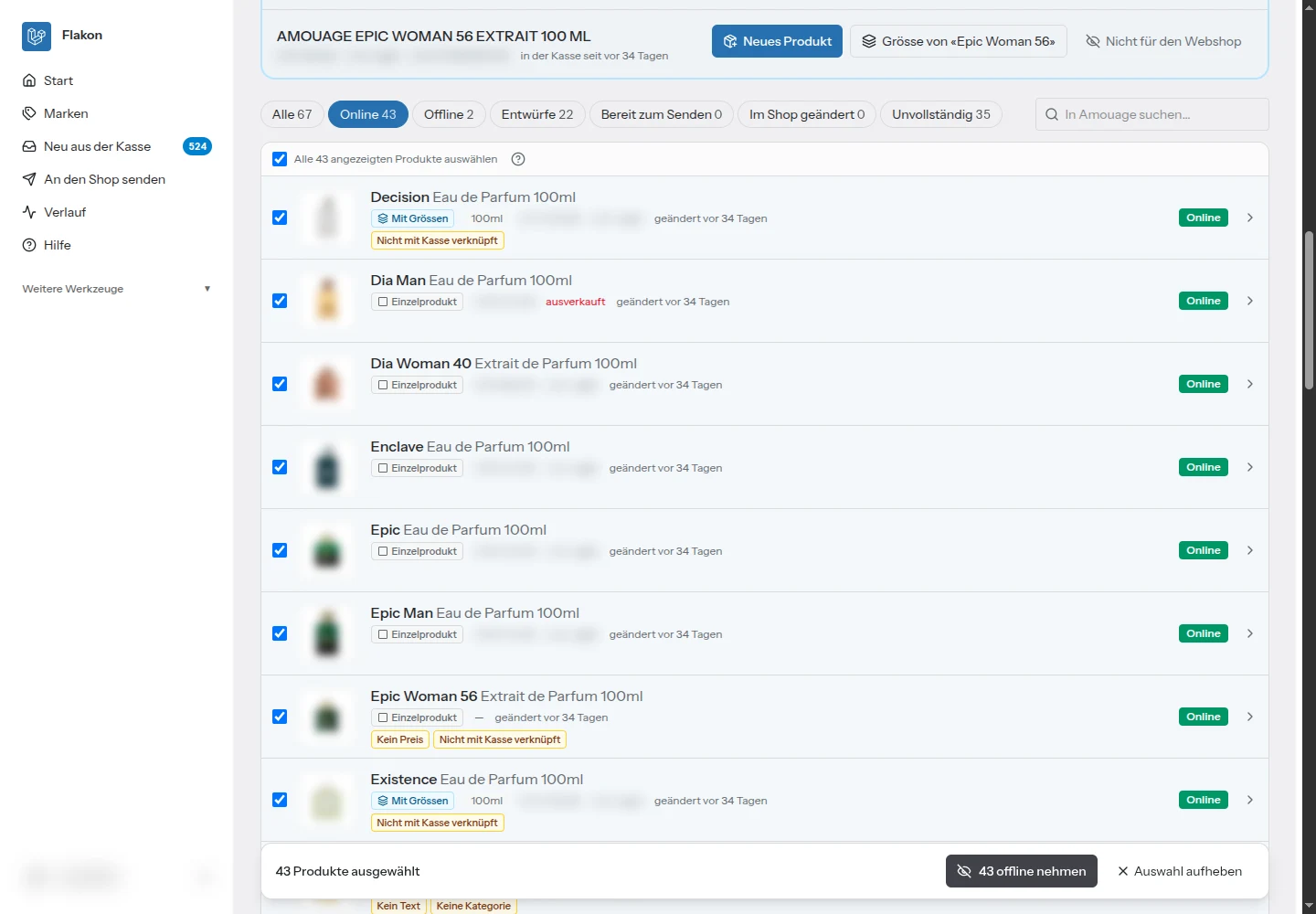
Bulk actions followed from the same observation. “Take this whole brand offline except these four products” is one editorial decision, yet the old interface turned it into dozens of separate operations. We added filters and selection so the customer could choose the online products, untick the exceptions, take the remaining selection offline and send it to the shop together.
A preview had to answer “what will my shop look like?”
Another finding was that a technical comparison of fields was not enough for someone deciding whether a product was ready. The customer needed to see the result in the actual shop layout: the title, pictures, sizes and relationship between products. We made sending changes to the staging shop part of the review workflow, so the customer could inspect them there before they went live.
We also kept “Save” and “Send” separate. Saving work in Flakon should not unexpectedly change what customers see, and the interface needs to tell the editor which version each shop currently shows. When a send runs, Flakon records what it intends to change, checks that the shop has not changed underneath that decision, writes the relevant fields and reads them back to verify the result.
This was also why we didn't simply forbid editing in WordPress. The customer still needed room to work, and pretending every change would always originate in our new editor would have recreated the same blind spot. Flakon detects changes made directly in the shop and lets the editor decide whether to adopt them or replace them, rather than silently winning an argument the customer never knew was happening.
“What changed?” became part of the product
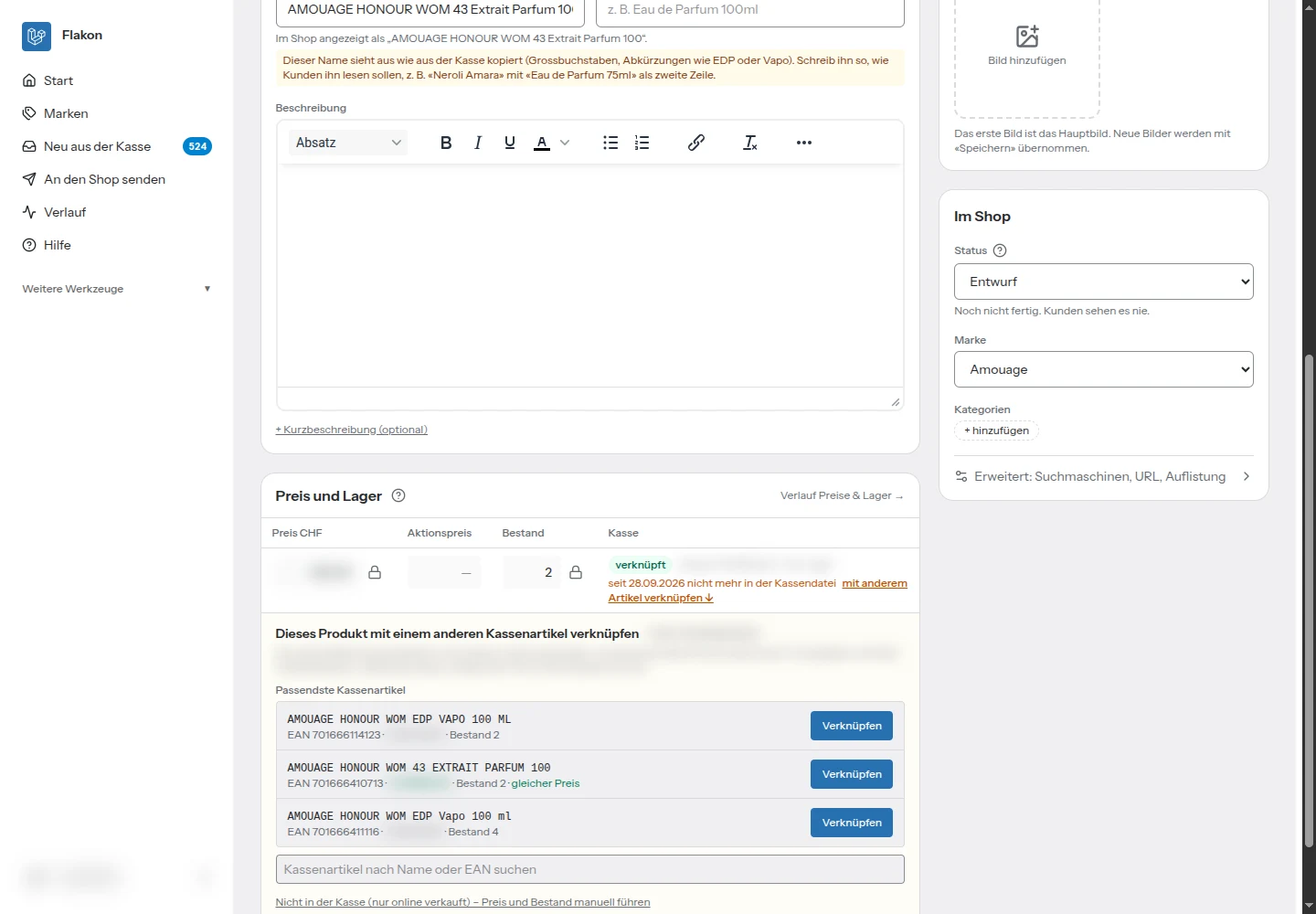
Incoming POS data should not leave the customer wondering what happened overnight. New articles go into an inbox, price and stock changes have a visible history, and changes to titles or brands are surfaced for review rather than silently rewriting the catalogue. When an EAN changes, the editor gets a way to link the existing size to the new POS article instead of rebuilding the product.
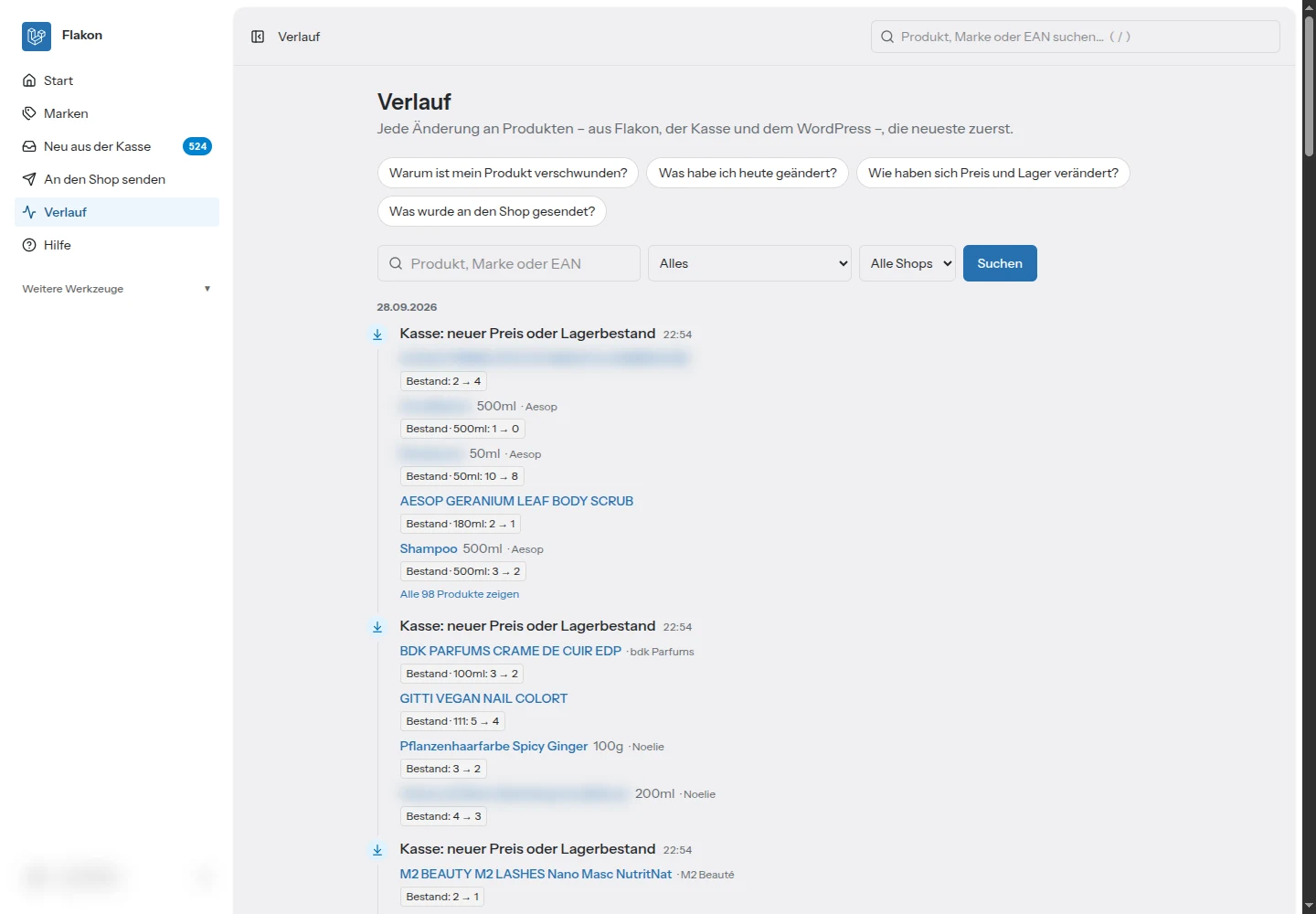
The design of the interface mattered as much as the log itself. We wanted the customer to be able to work without keeping an instruction manual open, so buttons describe the action, explanations appear where decisions are made, and the next step is visible on the product. “Link to another article” says more to an editor than a technical description of identity reconciliation; “Online”, “Offline” and “Draft” are easier to reason about than several overlapping visibility terms. Help is available, but the everyday workflow should explain itself.
We also learned that recording suspicious events is not enough if nobody notices them. In test operation we discovered that the customer had removed roughly 500 pictures to save disk space, although space was not a problem, and had used drafts to take finished products off sale. Those actions solved an immediate need from their point of view, but the old setup gave us little visibility into them. Flakon gained a prominent area for unusual events, including groups of removed images, deleted products and unexpectedly large changes, and it keeps its own copies of imported images so a record of a deletion can also lead to recovery.
The technology choices followed the job
Flakon is a separate Laravel application on PHP 8.4, with its own MariaDB database and a Vue 3 interface connected through Inertia, using TypeScript and Tailwind CSS. PHP fitted the existing managed hosting, while Laravel gave us the application structure, validation, scheduled work and queues needed for imports, history and synchronisation. Vue and Inertia let us build the interactive editor around the same application without adding a separate frontend API layer to operate.
More important than the framework names was the boundary with WordPress. Flakon reads shop data through a read-only database connection so it can compare the catalogue efficiently, but writes go through the WooCommerce REST API. Direct SQL writes might look faster, yet they bypass the behaviour the shop relies on: cache invalidation, lookup-table updates and integrations reacting to product changes. We wanted the shop to process changes through its own supported path, then independently checked what had arrived.
Products and sizes have their own identities inside Flakon, with the POS article linked explicitly. Product content and commerce values are tracked separately, so a price or stock update does not become permission to overwrite a carefully edited title or rearrange variants. POS stock is sent when the POS value changes, rather than blindly resetting it on every import and potentially undoing stock reductions from webshop orders.
The feed also gets plausibility checks before it is accepted. An empty file, a major drop in article count, duplicate EANs or an unusual stock jump should trigger investigation, rather than turn automatically into catalogue deletions. Together with change history, restorable versions and verified sends, those boundaries address the ways this particular workflow had already failed.
What changed for the customer, and what we should have done earlier
We built the first version quickly with help from AI and our experience with similar systems, then ran imports from both the POS and WooCommerce in test mode while watching the logs. The presentation went well, and over the following weeks the customer cleaned up nearly all the product data while we fixed bugs and adjusted the interface to the work happening in front of us.
Some changes came within hours of a real problem. A new EAN led to the relinking action, a size under the wrong scent led to “remove size” and a way back to the inbox, and repeated brand-wide changes led to bulk selection. The useful part was the feedback loop: we could see what the customer was trying to do, understand why the existing action was awkward, and improve the workflow instead of asking them to compensate for it again.
The chain is now POS → Flakon → WooCommerce, with a central place for product information. Replacing the POS is already planned, and replacing the shop later would no longer mean starting again with a catalogue whose only reliable version lives inside that shop. We have not turned the result into a made-up percentage of hours saved; the concrete improvement is that identity, editorial work, review and history now have a defined home.
The lesson for us was uncomfortable because we already knew it: never trust “the system works well” until you understand the work required to keep it that way. That is not an accusation that the customer is dishonest; people describe what they have learned to live with, and they cannot be expected to design the system they have never had. It was our job to investigate the workflow and recognise the need behind the request.
Had we done that at the beginning, we could have suggested Flakon earlier and saved both the customer and ourselves a lot of time, money and frustration. Debug the user stories, not just the code, especially when everyone tells you the code has been working for years.